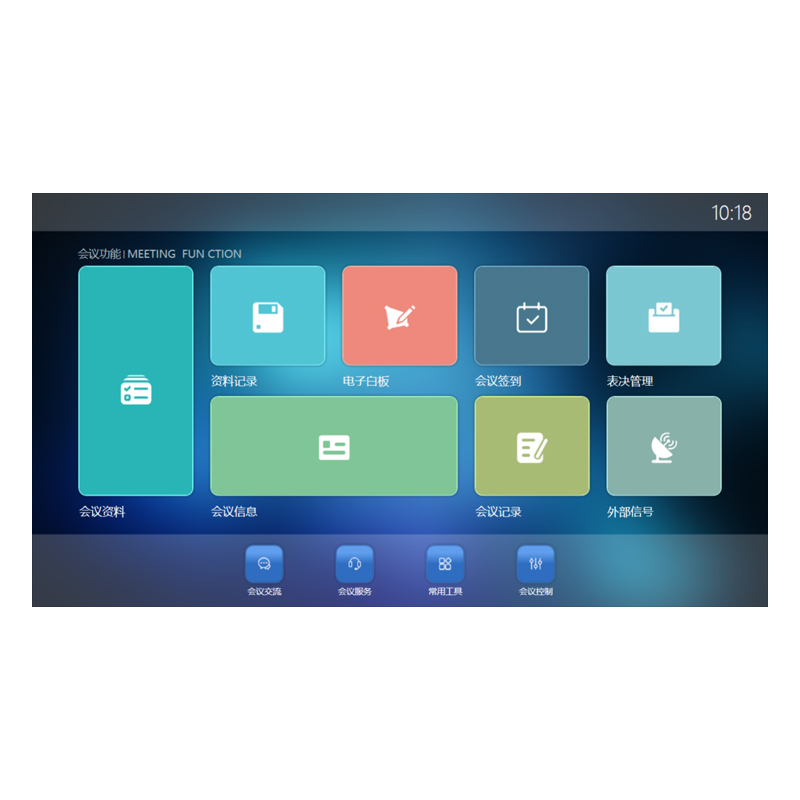
FionTu Intelligence – Multimedia Conference Client Visual Application Control Software FT-JVISUAL
Categories: Stage lighting
Category Stage lighting
| Feature/Parameter | Details |
| System Compatibility | Compatible with Windows 7, Windows 10, Android, HarmonyOS, KylinOS, and UnionTech OS. |
| Language Support | Multi-language support with seamless switching during use. |
| Role Configuration | Predefined roles include Chairperson, Secretary, and Participants for streamlined meeting control. |
| Welcome Screen Customization | Displays customizable content, such as meeting topic, time, participants' names (in English/Chinese), positions, and organizations. |
| Electronic Nameplates | Supports customizable participant information display on nameplates. |
| Sign-In Methods | Supports username/password sign-in, handwritten signature, secretary-assisted sign-in, and more. |
| Flexible Seating | Unassigned participants can select their seats from the participant list. |
| Face Recognition and Advanced Sign-In | Supports face recognition, QR code scanning, IC card, and fingerprint-based sign-ins. |
| Room Layout Visualization | Allows realistic meeting room layout design using a visual design tool. |
| Meeting Materials | Materials can include Office documents, PDFs, images, audio, and video; supports annotation and zoom functions. |
| Per-Agenda Material Access Control | Allows configuring participant-specific material access permissions for each agenda. |
| Agenda and Topic Management | Supports creating multiple agendas per meeting with linked materials and participants. |
| Participant Seating Arrangement | Visualizes and adjusts seating arrangements for the whole meeting or specific agendas. |
| Annotation Tools | Allows annotation and marking on meeting documents using touchscreens, keyboards, or handwriting pads. |
| Synchronized Screen Sharing | Participants can apply to share their screen, with options for forced or optional following. |
| Data Export | One-click export of pre-meeting and in-meeting materials. |
| Video Playback | Supports fast-forward, rewind, pause, and full-screen playback with on-screen prompts in Chinese. |
| Group Collaboration | Enables simultaneous group discussions on shared materials. |
| External Signal Integration | Allows preview, viewing, and sharing of external signals during meetings. |
| Screen Sharing and Projection Control | Enables projection of paperless terminal screens or external signals onto multiple displays. |
| Split-Screen Projection | Supports full-screen, two-split, and four-split projection modes. |
| Interactive Whiteboard | Supports single-user and multi-user modes, with content automatically saved; customizable for grouped interactions. |
| Messaging and Communication | Allows participants to send one-to-one or group messages during meetings. |
| Meeting Services | Enables service requests for items like tea, calculators, pens, and custom services. |
| Meeting Minutes | Provides quick meeting notes functionality with visual speaker selection. |
| Agenda Management | Supports starting/ending agendas, pausing meetings, and agenda-related voice announcements. |
| Voting and Polling | Supports real-time polling with custom durations, anonymous or named voting, and score-based voting. |
| Voting Order Control | Allows only one active vote at a time, managed by the secretary to ensure orderly proceedings. |
| Participant Privacy in Voting | Ensures participants cannot see others' votes during polling. |
| Vote Result Management | Real-time result statistics; chairperson and secretary can choose whether to display results. |
| Post-Meeting Data Destruction | Automatically deletes meeting materials from terminals after the meeting. |
| External Signal Preview | Supports multiple external signal previews and fullscreen display. |
| Signal Window Management | Auto-adjusts the external signal window position after inactivity (1 minute). |
| Real-Time Annotations | Saves document annotations and whiteboard content in real time. |
| Embedded Tools | Includes common tools like IE browser and calculator for participant convenience. |
Your email address will notbe published, Required fields are marked